spec-kit is GitHub's open-source toolkit for spec-driven development. You install one CLI, run six slash commands inside your AI coding agent, and the deliverable stops being the code. It becomes a living specification your agent reads, refines, and executes. 94k+ stars. Latest release v0.8.7. Works with Claude Code, Cursor, Codex, Copilot, Gemini, and 30+ other coding agents.
Repo: github.com/github/spec-kit
The problem nobody talks about
Vibe coding works for tiny scripts. Type "build me a todo app", watch the agent generate a plausible answer, ship it. Past about 200 lines, that loop collapses.
The agent drifts. It loses context after a compaction. It generates code for the wrong problem because the prompt was ambiguous and nobody pinned it down. You re-prompt, it changes direction, three iterations later you're fighting the model instead of building the feature.
The fix is not a better prompt. It's a spec the agent can read, debate, and execute against. spec-kit's own README puts it bluntly: an open source toolkit so you can focus on product scenarios "instead of vibe coding every piece from scratch."
Why this changes everything
Specifications become executable.Traditional dev treats specs as scaffolding you discard once the "real work" of coding begins. spec-kit makes the spec the artifact that drives implementation. Code regenerates from the spec, not the other way around.
Multi-step refinement, not one-shot. Six commands force the agent through constitution, requirements, clarification, planning, task breakdown, and execution. Each step has its own checkpoint. You catch ambiguity before any code gets written, not after.
Agent-agnostic. One CLI, 30+ integrations. Claude Code, Cursor, Codex, Copilot, Gemini, plus IDE assistants and CLI agents. Switch tools mid-project without rewriting your workflow.
Step 1: install Specify CLI
spec-kit ships as a Python CLI called specify. You install it once and use it across every project. Pin a release tag for stability (current latest is v0.8.7):
# Recommended: uv tool install
uv tool install specify-cli --from git+https://github.com/github/spec-kit.git@v0.8.7

# Alternative: pipx
pipx install git+https://github.com/github/spec-kit.git@v0.8.7
If you don't have uv, install it from docs.astral.sh/uv first. pipx works too and skips the uv dependency.
Verify the install:
specify versionPrerequisites: Linux, macOS, or Windows, Python 3.11+, Git, and a supported AI coding agent already installed.
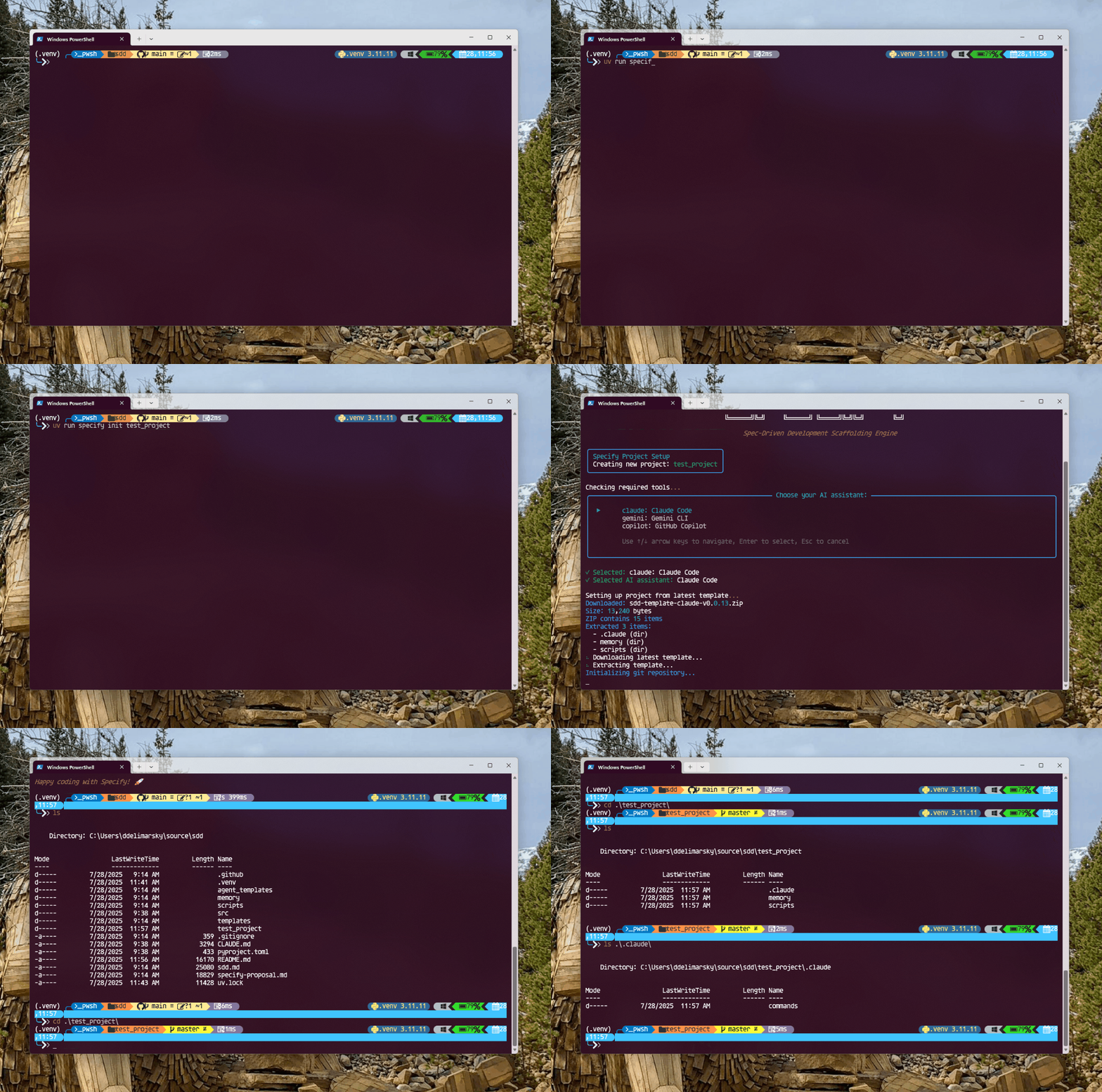
Step 2: bootstrap a project
Create a new project, or initialize spec-kit inside an existing one:
# New project
specify init my-app --integration claude

# Existing project (in current directory)
specify init . --integration claude
Replace --integration claude with copilot, cursor, codex, gemini, or any other supported agent. specify integration list shows what your installed version supports.
This drops a .specify/ directory plus the agent-specific command files (.claude/commands/ for Claude Code, .cursor/ for Cursor, and so on). Your AI agent now has the /speckit.* slash commands available.
Step 3: the six commands (in order)
Open your AI coding agent in the project. The workflow runs through six slash commands. Codex CLI uses $speckit-* instead of /speckit.*, but the order is identical.
1. /speckit.constitution
Sets the project's governing principles. Quality bars, testing standards, UX consistency rules, performance requirements. Everything downstream respects these.
/speckit.constitution Create principles focused on code quality, testing standards, user experience consistency, and performance requirementsRun once per project. Re-run only when your principles actually change.
2. /speckit.specify
Describes what you're building. Focus on the WHAT and the WHY, not the tech stack. The example from the README:
/speckit.specify Build an application that can help me organize my photos in separate photo albums. Albums are grouped by date and can be re-organized by dragging and dropping on the main page. Albums are never in other nested albums. Within each album, photos are previewed in a tile-like interface.Output: a spec.md file with requirements, user stories, and acceptance criteria. Read it. Edit it. The whole workflow keys off this file.
3. /speckit.clarify
The agent reads your spec and asks structured questions to kill ambiguity. Sequential, coverage-based questioning. Answers are recorded in a Clarifications section so the spec self-documents the decisions.
/speckit.clarifyThis is the step that pays for itself. Most agent failures trace back to a vague spec the model filled in with assumptions. /speckit.clarify forces the gaps into the open before any code is written.
4. /speckit.plan
Now you pick the tech stack. Architecture, libraries, deployment target. Output is a plan.md file the agent uses as the technical blueprint.
/speckit.plan The application uses Vite with minimal number of libraries. Use vanilla HTML, CSS, and JavaScript as much as possible. Images are not uploaded anywhere and metadata is stored in a local SQLite database.Be opinionated here. "Use the simplest thing that works" is a real instruction the agent will respect.
5. /speckit.tasks
Generates a dependency-ordered task list from the plan. Each task is small enough to execute and verify in one step. The agent will work through them in order.
/speckit.tasksOutput is a tasks.md with checkboxes. Edit if needed before implementation. Re-order, drop tasks, add tasks. The list is yours.
6. /speckit.implement
Executes every task in the list. The agent reads the constitution, spec, plan, and tasks, then builds. Checkboxes flip to checked as tasks complete.
/speckit.implementIf something breaks mid-way, you can stop, fix the spec or plan, and re-run. Because the spec is the source of truth, the agent doesn't lose progress when context resets.
The three optional quality gates
Beyond the core six, spec-kit ships three optional commands that catch issues before they hit production:
/speckit.analyze: cross-artifact consistency check. Run after/speckit.tasks, before/speckit.implement. Catches mismatches between spec, plan, and task list./speckit.checklist: generates custom quality checklists that validate requirements completeness, clarity, and consistency. The README calls these "unit tests for English."/speckit.taskstoissues: converts the task list into GitHub issues for tracking and team execution.
Extensions and presets
Massive community support. The official catalog has 60+ community extensions covering project management sync, security review, brownfield migration, parallel worktree orchestration, multi-model handoff, and more. A few examples:
- Jira and Azure DevOps integrations sync your spec-kit tasks straight into work items.
- Security Review runs secure-by-design audits on plans and implementations.
- Worktrees spawns isolated git worktrees so multiple agents can work in parallel without stomping on each other.
Browse the full catalog at the Community Extensions site. Install with specify extension add <name>.
Presets are different. They customize how spec-kit's existing commands behave (terminology, template format, compliance gates) without adding new commands. Useful if your team has organizational standards you need every spec to follow.
Honest limitations
Overkill for one-line fixes.Six commands is real friction. If you're tweaking a CSS variable or fixing a typo, just talk to the agent directly. spec-kit pays off on greenfield builds and feature work that'd otherwise take three iterations to land.
It's early. Latest release is v0.8.7. Commands have already been renamed once (/quizme became /speckit.clarify). Expect more churn before a 1.0.
Codex CLI is the odd one out. Most agents use /speckit.* slash commands. Codex CLI in skills mode uses $speckit-*. Not a dealbreaker, just worth knowing if you switch agents mid-project.
Quality still depends on the agent underneath.spec-kit gives the agent a better workflow. It doesn't make a weaker model smarter. The output is still bounded by whatever model is actually executing the tasks.
Resources
- Repo: github.com/github/spec-kit
- Docs: github.github.io/spec-kit
- Video overview: YouTube
- Supported agents: integrations reference
- Community extensions: speckit-community.github.io/extensions
The shift in one line: AI writes code becomes AI executes specifications. Try spec-kit on the next thing you'd normally vibe-code. Three commands in, you'll see why 94k people starred the repo.